The Convoy Platform API offers a fast and flexible way for brokers to integrate with our marketplace and take advantage of cutting edge automation and cost savings. Brokers can create, update, and receive real time updates as loads are matched and executed end-to-end without leaving their TMS. The platform is designed to support event-based integrations, letting brokers automate workflows in their system in real-time as execution progresses.
Production: https://developer.convoy.com/broker
Demo: https://demo-developer.convoy.com/broker
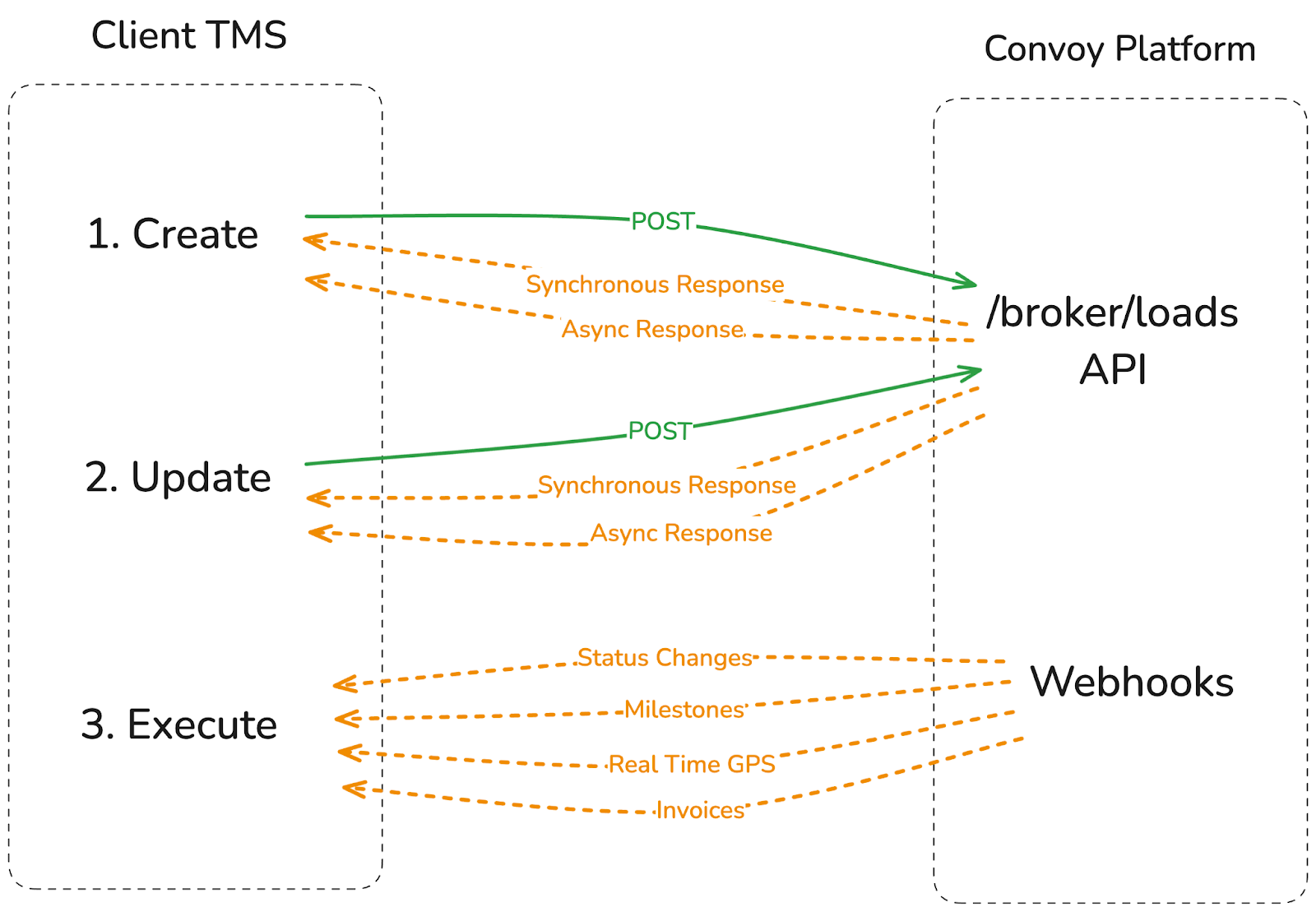
The Convoy Brokers API requires authorization in order to interact, see Authorization for more details.
The Convoy Brokers API is versioned, see Versioning for more details.
Step 1: Create Loads
The first step in the integration process is to create a new load to be fulfilled on the Convoy marketplace. This is done by making a POST to the Create/Update API Endpoint. We recommend sending all eligible loads to the platform upon creation in your TMS.
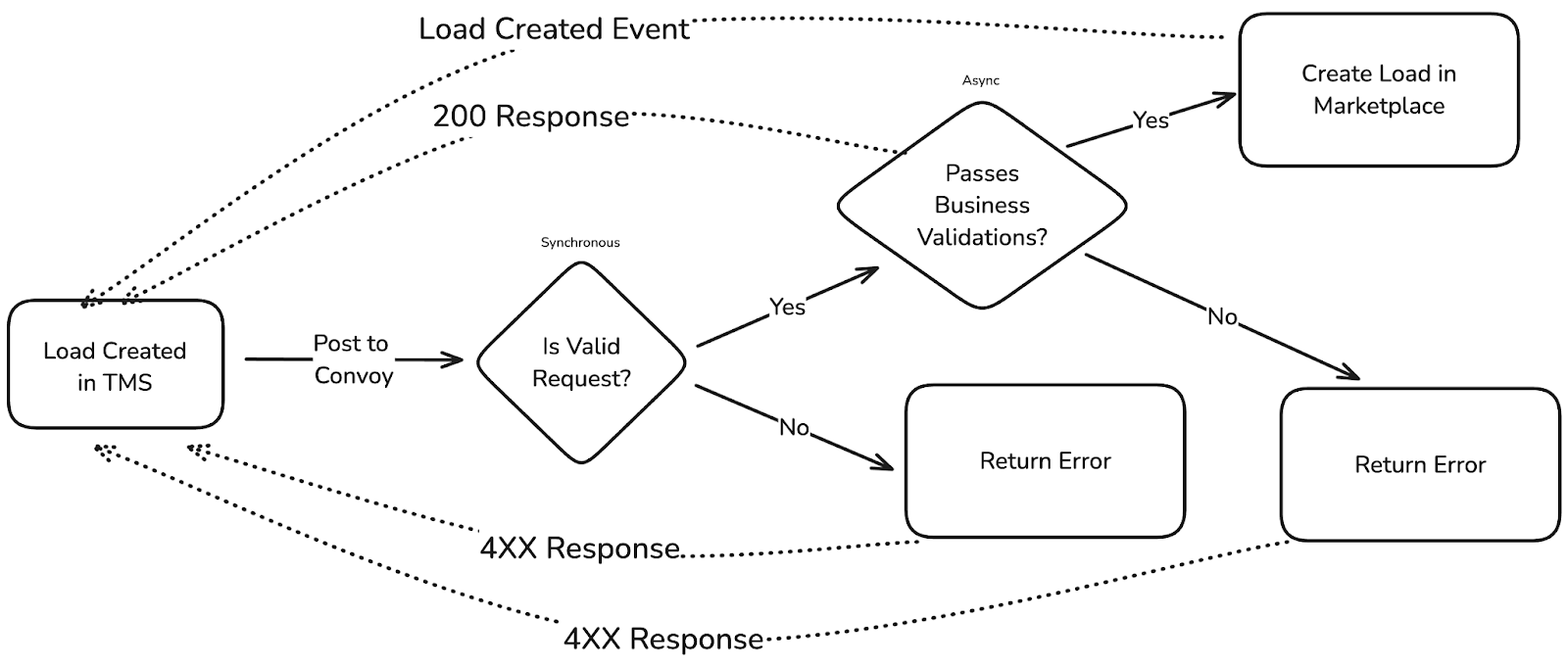
The platform will return a synchronous response confirming the payload was successfully received, or flag payload validation errors. Once received, the platform will asynchronously validate that the load meets all the platform’s business requirements - if there are issues the platform will send an error message to the broker system via webhook event (load.sync.processed). This could be due to a violation of business logic (e.g. invalid address, pickup date in the past) or an unsupported load type. Syncing failures can also be viewed in the Broker Web portal. If a load is successfully ingested, it will be posted to the marketplace to be matched and executed.
During load creation, beyond specifying the basic requirements of the load, the broker system will also provide cost targets and constraints for the marketplace to drive the carrier negotiations and matching experience.
Step 2: Update, Cover, and Cancel Loads
We recommend syncing any load changes upon update. With any change in the load details, such as appointment schedules or delivery dates, the broker system updates loads on the Convoy platform by submitting a POST to the same Create/Update Endpoint and including the same original External ID (the ID in the broker system). 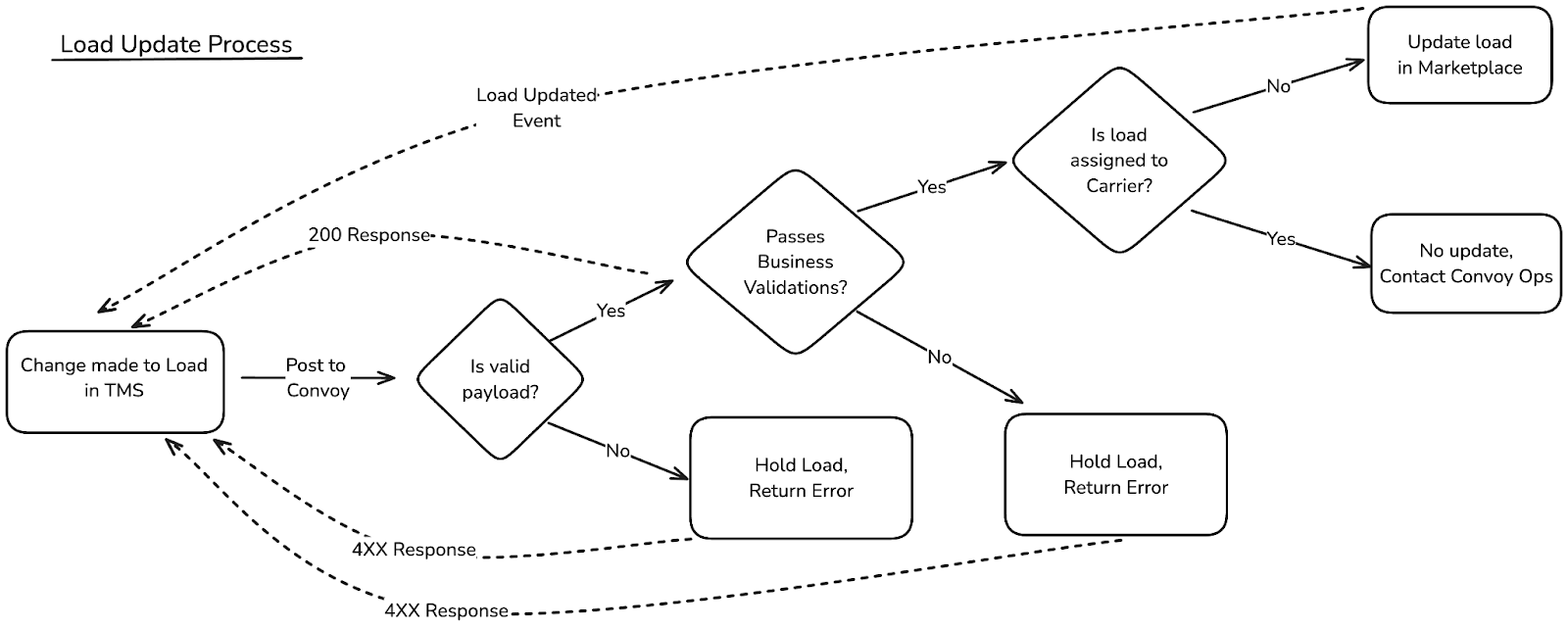
If a load is covered or canceled off-platform, the integration layer notifies Convoy Platform of the status change which will remove the load from the marketplace to avoid further carrier activity.
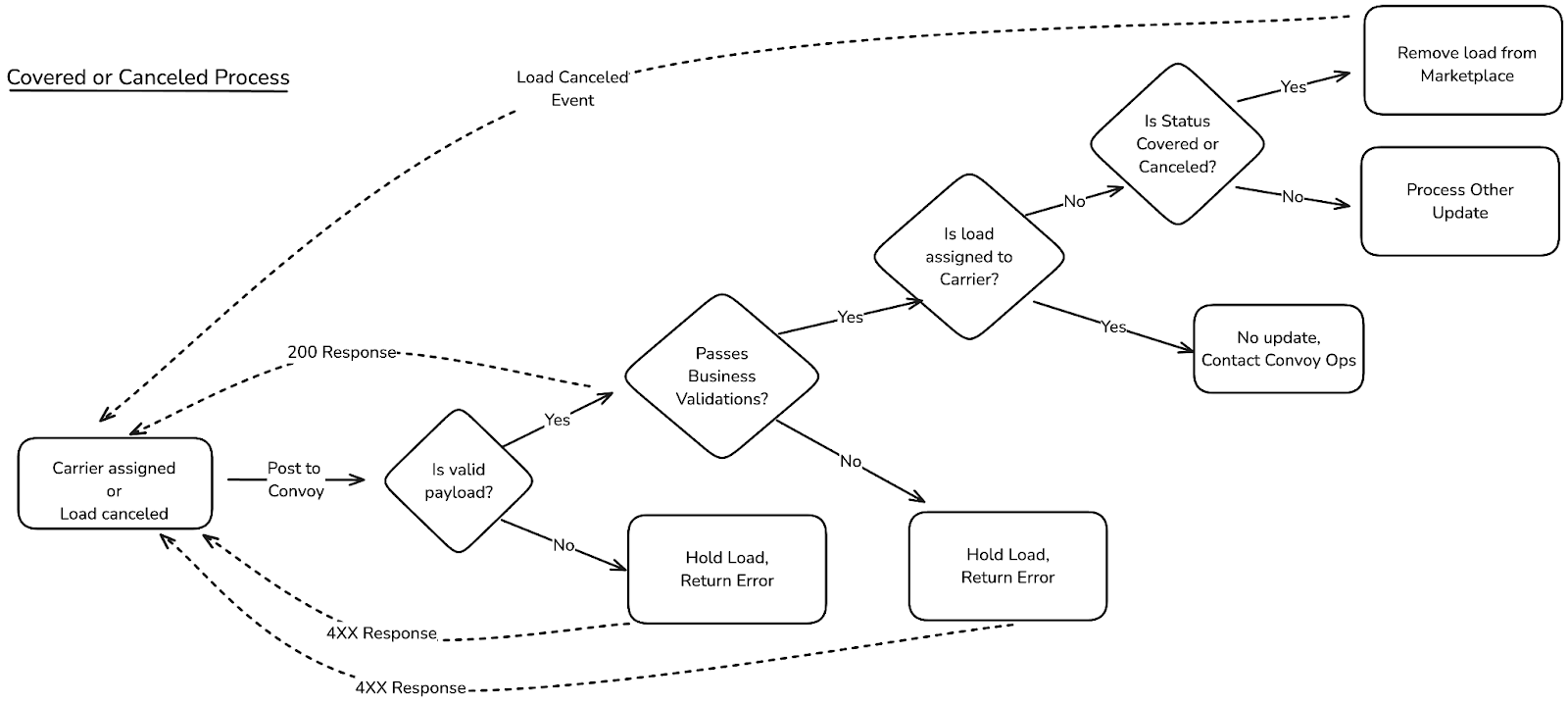
The platform will return a synchronous response confirming the payload was successfully received, or flag if there was an ingestion error. Asynchronously, the platform will also validate that the update is a valid payload and complies with all business requirements.
Loads can be updated or marked as covered up till the load has been assigned to a carrier. Once matched, customers must reach out to the Convoy Platform ops team to make any changes or cancellations. Updates provided via API will not be implemented.
Step 3: Load Matching
When a load matches and the carrier confirms the rate, Convoy will notify the broker system via webhook. If the load has already been matched by the broker, the broker system will notify Convoy and the platform will cancel the load and notify the removed carrier. Otherwise, the load will be assigned to Convoy in the broker system and execution will proceed.
If the carrier falls off the load it will be automatically returned to the marketplace to find a new carrier.
Step 4: Tracking and Updates
Throughout the lifecycle of the load, the Convoy platform will emit event based updates as the load is matched and executed. Starting with bid acceptance, Convoy Platform will emit a webhook payload with details about each event that happens with the load - detailed in the table below.
While in transit, the platform will provide milestone updates and real time location data, with a GPS location every 5 minutes. Brokers can leverage these webhooks to update their TMS and trigger workflows. A list of current webhooks can be found in the table below.
| Webhook | What is it? | How do I use it? |
|---|---|---|
| batchDebit.failed | A batch debit transaction failed after the associated money transfer was attempted. A batch debit aggregates overdue invoices and processes a single transaction to withdraw the total amount owed. | This is valuable for broker partners to be informed about failed payment transactions. |
| batchDebit.paid | A batch debit transaction was successfully completed after the associated money transfer occurred. A batch debit aggregates overdue invoices and processes a single transaction to withdraw the total amount owed. | This is valuable for broker partners to be informed about successful payment transactions. |
| batchDebit.scheduled | A batch debit transaction was scheduled at processingDate. A batch debit aggregates overdue invoices and processes a single transaction to withdraw the total amount owed. | This is valuable for broker partners to be informed about upcoming payment transactions. |
| load.booking.created | A load was booked with a carrier, either by choosing to book now, the carrier bid was auto-accepted or the carrier confirmed the broker-accepted bid. | This is valuable for broker partners to mark the load as matched in their TMS and potentially onboard the carrier. |
| load.booking.canceled | The load booking was canceled, potentially by the carrier. | This is valuable for broker partners to remove the carrier assignment in their TMS and seek a new carrier. |
| load.creditMemo.issued | The credit memo has been issued, detailing how much the credit was issued. | This is valuable for broker partners to be informed about credits issued on their account. |
| load.documents.approval.updated | The load documents' approval has been updated. | This is valuable for broker partners to automate downloading documents and changing the approval status in their TMS. |
| load.fulfillment.delivered | The load has been delivered to the final destination. | This is valuable for broker and/or visibility partners to track delivery of a load. |
| load.fulfillment.driver.updated | The carrier has assigned or unassigned a driver for a load or driver contact information has changed. | This is valuable for brokers to track the driver that is fulfilling a load. |
| load.fulfillment.equipment.updated | The carrier has assigned/updated equipment information for a load. | This is valuable for brokers to track the equipment being used to fulfill a load. |
| load.fulfillment.exception.created | A shipment exception has occurred. | This is valuable for brokers to know so that they can understand and resolve issues that occur during load execution. |
| load.fulfillment.location.updated | The latest detected location of the carrier on a load. | This is valuable for broker and/or visibility partners to track loads when the trailer is on the move. |
| load.fulfillment.stop.updated | The carrier has arrived or departed a stop. | This is valuable for broker and/or visibility partners to track progress on a load. |
| load.invoice.billed | The invoice has been issued, detailing the final fees the broker must pay to the Convoy Platform. | This is valuable for broker partners to be informed about new invoices. |
| load.sync.processed | Result of asynchronous load validation | This is valuable for broker partners to be informed about the results of the load synchronization process. |